
Showing posts with label Application. Show all posts
Showing posts with label Application. Show all posts


How to Video Chat in Facebook using an Online Application for Free
Labels:
Application,
facebbook,
Video Chat in Facebook
How to Video Chat in Facebook using an Online Application for Free
Facebook is the world’s biggest social networking portal. It has almost all the features that can be said as the core social networking features mandatory for any social networking website. But one feature that I find missing in Facebook is Video Chat. Although facebook has its own chat box where people can chat with their friends right inside facebook but it does not have any utility of Video Chatting embedded into it.
In this post I will tell you about an online third party application that you can use to video chat with your facebook friends and that too for free. The name of this application is sockchat. Just in the morning when I woke up – I was searching for a solution that could allow me to video chat with my friends. After Googling I found sockchat as a perfect solution for this.
Although I have used this online web service but still I don’t have much knowledge about the Privacy control in the application. But lets come back to a quick fact – video chatting can be done via sockchat with your facebook friends.

Using this application is really very simple. All what you have to do in order to video chat with your facebook friends is to just allow this application to access your profile data with their facebook connect feature. Then you will need to fill up a simple form about your nick name to be used in chatting and other basic information. And that is it – you will see all your friends in the left pane of the chatbox and you can invite anyone of them for a video chat with you.
Foodspotting Users
Labels:
Application,
facebbook
Foodspotting Users
Foodspotting has seen referral traffic from Facebook quadruple and monthly average users double since the upgraded for timeline this January.
Facebook’s developer blog recognized the food app for its use of action verbs spot, love, nom, try, and want.
The post went on to say of Foodspotting:
For existing users, Foodspotting shows a notification to encourage people to add the app to timeline. The call to action gets people to share, which fuels the loop that grows your app.
Foodspotting creates interesting stories by providing detailed information about each dish — such as location or the number of friends who have loved a dish — through custom properties.
With this information, Foodspotting can create more meaningful timeline aggregations, such as where I’ve eaten.
Finally, to make the stories really stand out in news feed and timeline, Foodspotting displays large user-generated photos by setting the user-generated photos property on the spot action.
 |
| Double food for Facebook. |
Facebook Massenger
Labels:
Application,
facebbook,
Facebook Massenger
Download Facebook Messenger for Windows as a standalone desktop app with which you can use without visiting the website facebook.com. Facebook released the new Facebook messenger as a trial app and you can download and try it right now
Download Facebook Messenger

As you surf the web, you can use the Facebook Messenger for Facebook Chat with your Facebook friends, see the latest updates from your friends in ticker and get quick Facebook updates and notifications.
After installing Facebook Messenger, you can easily do Facebook login and logout by right-clicking the Facebook icon in Windows system tray. Once you open the app, the app is undocked by default so that you can move it around your computer screen, but you can dock the app and fix it on the screen also.
Choose the “Keep me logged in” option and Messenger will keep you logged in to Facebook even after you close your browser or navigate away from Facebook. Remember, choosing Exit will close the app but still keep you logged into Facebook; therefore choose Log out to completely logout of both the Messenger app and facebook.com, especially if your computer has multiple users or public use.
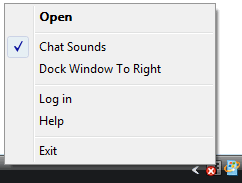 |
| Facebook Window Chat |
Facebook Messenger has some limitations – unlike the website login, you cannot perform Facebook Chat with multiple friends, video calling, limit chat availability and edit settings as of now. You will need to go to your browser and login for that.
Download Facebook Messenger (.exe file). This will download a small .exe file, click that and it will download and install Facebook Messenger. The app will automatically install updates in future. Since this is a trial app, be ready to expect outages and periods of instability at times. System requirement says you need Windows 7 (but I was easily able to download on my Windows Vista). You can uninstall Facebook Messenger anytime from WindowsControl Panel.
Develop Facebook Fan Page
Labels:
Application,
Develop Facebook fan page,
facebbook
Facebook has many features that make it definitively from his opponents. Such a star is in Your Facebook Fan Page. any fan page can be a device with which you can develop the social network, interact with clients and customers and promote your business.Fan pages are accessible perhaps to customers who re-registered non-sense that the pages of the fan can be public (visible in each one). This is often very good for merchants who wish to give part company or want to manage your reputation, as these pages may be (and sometimes may be) referred to by Google

The Best Facebook Fan Page Apps
Labels:
Application,
facebbook,
Facebook application page
An exceptional and non-stressful way for all fans to participate.Place a custom poll and now we have your fans exclusive selection of different designs of response (s). Send an update about the census can double the result (moderate the messages, not very often). Tweet about it, anything to achieve its outside.great way to gather data and test responses. alert your fans the final results and opinions call.

NetworkedBlogs
This application is best if you want to connect to the web site or blog to fan fb. a setting from the app is pretty easy.
SlideShare
One of these programs must have if you are in slide shows. Do not lay the slides on SlideShare, integrating the site into account the fan (the restriction of one account per fan site). Import existing shows or selected based on relevance and the fans will love you for it.
NutshellMail
The best gift, like Facebook is NutshellMail your publication message. read this app will allow you to create an opt-in area within your Facebook fan page for fans to register to get automatic notifications of activities within the page.
reviews
Comments similar testimony. Now you can call your fans to reconsider your weblog, service or product to build credibility.Give viewers many new ideas for your corporate identity.
tweet
It is a great software that is able to develop a distance from your company in both the networking sites. If you add programs to the Twitter page of Facebook, information published by its own fan page you automatically receive public profile trill you very much.
YouTube Background Commitment
When you use up the software, you can add video to your visitors interact. the one hand they are able to enrich the user experience;around the other integrates YouTube account on fb your website.Furthermore, it allows you to search for YouTube movies, add others and allow your users to watch and share movies.
Feed Burner Facebook Profile
Labels:
Application,
facebbook,
Feed burner

FeedBurner RSS feeds, one of the major providers, now part ofGoogle created its own Facebook Platform Title Animator,Animator of the blog title, it will display the latest headlines fromyour FeedBurner blogs, podcasts and RSS Facebookvartotojų.Antraštė Animator dynamically generated graphicsaddon that can be customized as well and show your Facebookprofile.
Some Great Facebook Tips and Tricks
Labels:
Application,
tips
- Facebook: Cleaner get you rid of from unwanted ads and updates that is usually appears on your Facebook pages.
- Sendible make available the feature of scheduling Facebook messagese in advance of time, thus you can send messages to your desireddestinationin the future.
- Ifyou want to upload photos to Facebook from Flickrthen you can use Flickr2Facebook web service. This is not an official service form Flickr/Facebook.
- NutshellMail combines with your Facebook accounts through the inbox you use the most.
- While SocialOomph, Sendible and HootSuite offer the same kind of service, the simplest way to schedule Facebook status updates is by using the easy, free Later Bro service.
Just sign in with Facebook Connect, select your time zone, type in what it is you’d like to say, set the calendar and clock to when you’d like to say it, and presto!
HOW TO: Turn Your Status Updates Into a Word Cloud
Labels:
Application,
tips
There’s a really fun way to visualize anyone’s status updates (even an entire country’s) as a word cloud. The Status Analyzer 3D app will look at what it is you’ve been chatting about lately and generate a list, and then a pretty, colorful, animated cloud as pictured above.
You can share the results with others on the social networking site by posting it to your friends’ walls or by adding it to your profile.
You can share the results with others on the social networking site by posting it to your friends’ walls or by adding it to your profile.
HOW TO: Have Fun With Facebook’s Humorous Language Options
Labels:
Application,
tips
While you can always change your setting into more sensible alternative languages, the site offers a couple of fun linguistic Easter eggs.
You can chose to have Facebook display upside down English, or, for anyone feeling a little salty, in “pirate.” Pirate essentially turns your status into your “plank,” your attachments into “loot” and instead of “share” it offers the option to “blabber t’ yer mates.”
Sadly, anything you type in the status bar won’t be upside down, or pirate-y. But with the use of some external sites you can achieve the same effect.
TypeUpsideDown.com and UpsideDownText.com are just two examples of sites that can flip your text, while the Talk Like a Pirate Day site can help you with your pirate translations.
You can chose to have Facebook display upside down English, or, for anyone feeling a little salty, in “pirate.” Pirate essentially turns your status into your “plank,” your attachments into “loot” and instead of “share” it offers the option to “blabber t’ yer mates.”
Sadly, anything you type in the status bar won’t be upside down, or pirate-y. But with the use of some external sites you can achieve the same effect.
TypeUpsideDown.com and UpsideDownText.com are just two examples of sites that can flip your text, while the Talk Like a Pirate Day site can help you with your pirate translations.
HOW TO: See Status Updates From Around the World
Labels:
Application,
tips
If you want to get a glimpse of the thoughts of Facebook users from around the world’s, head over to OpenBook.
Created by three San Fran web developers with a serious privacy message in mind, the site aggregates the status updates of everyone whose privacy levels are set to “everyone.”
You can narrow your searchable results down by gender and keywords to find out what people are saying about a certain topic. Or you can just browse the recent searches.
Created by three San Fran web developers with a serious privacy message in mind, the site aggregates the status updates of everyone whose privacy levels are set to “everyone.”
You can narrow your searchable results down by gender and keywords to find out what people are saying about a certain topic. Or you can just browse the recent searches.
HOW TO: See Your All Status Update List and Stats
Labels:
Application,
tips
Have you ever wondered how many times you have updated your status on Facebook? The Facebook app Status Statistics, can tell you this and more.
The app analyzes your updates and gives you a tidy list of how many you’ve written, the average word count and how many times a day you post. In addition, it generates a graph that shows you what time of day or what days of the week you normally update.
Old statuses are also searchable via the app, so you can find that witty retort you made back in November 2009 without having to scroll back through your history.
The app analyzes your updates and gives you a tidy list of how many you’ve written, the average word count and how many times a day you post. In addition, it generates a graph that shows you what time of day or what days of the week you normally update.
Old statuses are also searchable via the app, so you can find that witty retort you made back in November 2009 without having to scroll back through your history.
HOW TO: Add a Dislike Option to Your Status Update
Labels:
Application,
tips
“Like” buttons are everywhere on Facebook, and they’re everywhere on the web. But what if you want to update your status or share something that your friends can “dislike?” We know, your friends can choose to “comment” on your post, but where’s the fun in that?

The clever Status Magic Facebook app can add a dislike button to any status updates posted via the app. And if you wanted to really mix it up you can actually customize the second emotion to anything, such as “love,” “hate,” “disagree” or even “LOLs.
The clever Status Magic Facebook app can add a dislike button to any status updates posted via the app. And if you wanted to really mix it up you can actually customize the second emotion to anything, such as “love,” “hate,” “disagree” or even “LOLs.
How to Use Facebook Free On Mobile Withoud Data Charges
Labels:
Application,
tips
Exclusive news for facebook users across india, who use facebook in their mobile. Facebook Zero allows you to update status messages and read status messages updated by your friends on your mobile
 |
| 0.facebook.com |
When you access facebook from your mobile, you normally redirected to http://m.facebook.com . The new service, automatically takes you to http://0.facebook.com and there will be no data charges by your carrier.
This is currently available at no data charge only for Reliance and Videocon users.
Veoh tv broadcaster for Facebook
Labels:
Application
Veoh tv broadcaster for Facebook

The Veoh Internet tv broadcaster will let you add a Favorites video player to your Facebook profile, and is fully integrated with the Veoh platform and favorite videos feature.

The Veoh Internet tv broadcaster will let you add a Favorites video player to your Facebook profile, and is fully integrated with the Veoh platform and favorite videos feature.
Box File Sharing App
Labels:
Application,
tips
Box File Sharing App

The Box file sharing application built on Facebook’s platform lets users display files directly from their Facebook profiles. With a Box in your profile you can share files with your facebook pals. Box.net offers a file sharing application to be used within Facebook’s larger network.
Channels.com on Facebook App
Labels:
Application
Channels.com on Facebook App

Channels.com is a site devoted to select teh best video content from the net. The Channels.com app has been integrated into Facebook to delivery daily video clips from your favorite television shows, as listed in your Facebook profile.

Channels.com is a site devoted to select teh best video content from the net. The Channels.com app has been integrated into Facebook to delivery daily video clips from your favorite television shows, as listed in your Facebook profile.
Dogster Facebook Applications
Labels:
Application
Dogster Facebook Applications
 Dogster are a set of applications for Facebook intended for dog lovers.
Display your favorite Dogster dogs on your Facebook profile
This app allows anybody to show off their Dogster dogs on Facebook.com.
They got also four other Dogster Applications for Facebook
1- My Dogster: This App displays any or all of your Dogster dogs in your Facebook profile page.
2- Dogster Rescue: Displays dogs that are in shelters seeking new homes. Whit this addon you can help this dogs to find a new home and show their info and picture for others to see on your Facebook profile page.
3-Daily Dog Pill: This is a Application which lets you display a large dog picture in your facebook profile page.
4-Dogster Cute: It displays a random selection of cute Dogster member photos from Dogster website.

Display your favorite Dogster dogs on your Facebook profile
This app allows anybody to show off their Dogster dogs on Facebook.com.
They got also four other Dogster Applications for Facebook
1- My Dogster: This App displays any or all of your Dogster dogs in your Facebook profile page.
2- Dogster Rescue: Displays dogs that are in shelters seeking new homes. Whit this addon you can help this dogs to find a new home and show their info and picture for others to see on your Facebook profile page.
3-Daily Dog Pill: This is a Application which lets you display a large dog picture in your facebook profile page.
4-Dogster Cute: It displays a random selection of cute Dogster member photos from Dogster website.
InTune Facebook Application
Labels:
Application
InTune Facebook Application

inTune allows you to know what is the most popular music among Facebook users, your Networks, or just your friends. This allows you to discover new artists from people who have similar tastes as you. In addition, inTunes helps you to discover new music by suggesting related artists or songs based on the songs you are currently playing in inTunes.

inTune allows you to know what is the most popular music among Facebook users, your Networks, or just your friends. This allows you to discover new artists from people who have similar tastes as you. In addition, inTunes helps you to discover new music by suggesting related artists or songs based on the songs you are currently playing in inTunes.
Shareaholic for Facebook - Mozilla Firefox Addon
Labels:
Application
Shareaholic for Facebook - Mozilla Firefox Addon

Shareaholic for Facebook - Mozilla Firefox Addon
Shareaholic is a firefox addon that allows the navigator user to share interesting webpages using Facebook, Twitter, Email, Gmail, Reader, Bookmarks, Buzz, Evernote, Bit.ly, and more... Works with 100+ services. This is a really simple to use tool for the link sharing of your favorite pages. If you constantly share websites you like with other facebook users this tool will be very handy

Shareaholic for Facebook - Mozilla Firefox Addon
Shareaholic is a firefox addon that allows the navigator user to share interesting webpages using Facebook, Twitter, Email, Gmail, Reader, Bookmarks, Buzz, Evernote, Bit.ly, and more... Works with 100+ services. This is a really simple to use tool for the link sharing of your favorite pages. If you constantly share websites you like with other facebook users this tool will be very handy
Subscribe to:
Posts (Atom)
The CooL Corner
-

Cool Tips
Amaze your Friend with Coolest Facebook Tips Ever!
-

Kick-Ass Games
All the Kick-Ass Facebook Gams to play with Friends
-

Amazing Apps
Amazing apps to blow your mind! Amaze your friends!
-

CooL Status
Show How CooL are You! Post the coolest funniest FB Status ever!